web analytics
Shadow

Author: tonermaroc

Thermal Printing Explained: Types, Uses, and Benefits

Thermal Printing Explained: Types, Uses, and Benefits

Blog
Thermal Printing Explained: How It Works, Types, Uses, and Benefits Thermal printing is one of the most important printing technologies used in modern business, even though many people do not notice it. From retail receipts and shipping labels to hospital wristbands and barcode stickers, thermal printing is everywhere. It plays a major role in industries that need fast, clear, and reliable printing without the mess and cost of traditional ink or toner systems. If you have ever received a store receipt, printed a courier label, or seen a barcode tag on a product, there is a good chance it was created using thermal printing. Its speed, simplicity, and low maintenance make it a practical choice for businesses that print large volumes every day. What Is Thermal Printing? Thermal printing...
How to Fill Printer Ink the Easy Way

How to Fill Printer Ink the Easy Way

Blog, REFILL TONER
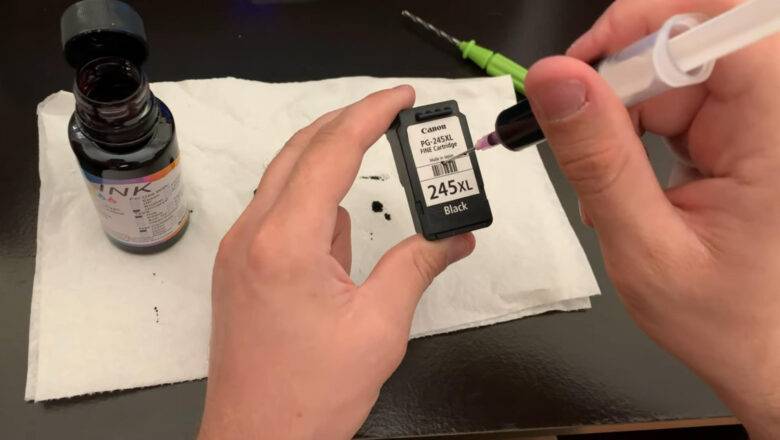
How to Fill Printer Ink the Easy Way Learning how to fill printer ink sounds simple, but many people get confused because not all printers use the same system. Some printers use refillable ink tanks, while others use cartridges that are usually replaced instead of manually refilled. That is why the easiest and safest method depends on the type of printer you have. If you want to know how to fill printer ink without making a mess or damaging the printer, the first step is to identify whether your printer uses ink bottles, refill tanks, or standard cartridges. Once you know that, the process becomes much easier and far less stressful. Before You Start, Check Your Printer Type The most important step in how to fill printer ink is knowing what kind of printer you own. This matters becaus...
Epson Printer Company: History, Growth, and Success

Epson Printer Company: History, Growth, and Success

Blog
Why the Epson Printer Company Became a Global Leader in Printing The Epson printer company is widely seen as one of the most influential names in modern printing. While calling any one brand the single “most successful” printer company is hard to prove objectively, Epson has clearly earned a leading place in the industry through a long history of technical innovation, strong product development, and a major global presence. Its path from precision manufacturing in Japan to worldwide recognition in printing is one of the most important stories in the industry. The early roots of Epson The story behind the Epson printer company begins in Japan. Epson traces its roots to Daiwa Kogyo, Ltd., founded in 1942, and later to Suwa Seikosha, a company involved in precision manufacturing. A major...
Printing For Profit: The Intriguing History of Counterfeiting Money

Printing For Profit: The Intriguing History of Counterfeiting Money

Blog
Counterfeiting money is a practice as old as money itself. Throughout history, counterfeiters have employed increasingly sophisticated techniques, and the advent of printers ushered in a new era of counterfeit currency production. Let's delve into the fascinating history of counterfeiting money with printers. Ancient Origins Counterfeiting predates the invention of the printing press. In ancient times, counterfeiters would manually replicate coins, a labor-intensive process that required skill in metalwork. The introduction of paper money in China during the Tang Dynasty (618–907 AD) provided new opportunities for counterfeiters, although hand-crafted reproductions remained the norm. The Printing Press Revolution The printing press, invented by Johannes Gutenberg in the 15th century, h...
The Printing Powerhouse: Unveiling the Printer Industry in China

The Printing Powerhouse: Unveiling the Printer Industry in China

Blog
When we think of technological giants, China is undoubtedly at the forefront of our minds. The nation has not only emerged as a global manufacturing hub but has also made significant strides in technology and innovation. The printer industry in China is a testament to this progress, showcasing the country's prowess in both manufacturing and innovation. A Historical Glimpse The history of printing in China dates back over a thousand years, with its earliest forms involving woodblock printing. This ancient technique was instrumental in disseminating knowledge and culture throughout China and beyond. Fast forward to the modern era, and China is a driving force in the global printer industry. Manufacturing Dominance China has long held a dominant position in the manufacturing of printers a...
The Evolution of Printing: Printer Industry’s History

The Evolution of Printing: Printer Industry’s History

Blog
The printer industry, a cornerstone of modern offices and homes, has a rich history that spans centuries. From its humble beginnings to today's cutting-edge technology, the evolution of printing has been a fascinating journey. Let's embark on a historical tour of the printer industry. Ancient Beginnings Printing can be traced back to ancient civilizations. The Chinese are credited with inventing the first printing technique around 200 CE, using woodblocks to reproduce images on paper. This early form of printing made its way to Korea and Japan, where it flourished. The Gutenberg Press Revolution Gutenberg's press, with its metal type, allowed for the mass production of books, marking the start of the "Printing Revolution." His most famous work, the Gutenberg Bible, printed around 1455,...
How to Reset Samsung Printer Firmware?

How to Reset Samsung Printer Firmware?

Blog, RESET PRINTER
I need to reset my Samsung printer firmware because it hasn't been updated in a while. Additionally, I've been experiencing some printing problems, so I believe that resetting the printer firmware is the most effective way to resolve these issues. Can someone provide me with guidance on how to reset the Samsung printer firmware in the simplest manner? Your assistance would be greatly appreciated! Fundamental Samsung Printer Factory Reset Step 1: To start, quickly press the following keys: 1, 9, 3, 4. Step 2: Upon pressing these keys, a message reading "TECH" will appear. Step 3: Next, select the Menu key and then press Enter. Step 4: You will now see "TECH MODE" displayed on the screen. Step 5: Now, you need to press the "<" key twice. When you see "NEW CARTRIDGE" on your ...
Summary of Samsung CLP-320/325 Firmware Fix Solution and reset

Summary of Samsung CLP-320/325 Firmware Fix Solution and reset

RESET PRINTER
Resolve Samsung CLP-320/325 Printer Issues: Low Toner, Toner Depleted, Replace Toner/Stop, Install New Cartridge, Repair New Cartridge, Ready Toner, End of Life - Replace New Cartridge, Depleted Toner, Error with Blinking Red Light. Samsung CLP-320N Firmware Solution involves the reprogramming of the printer's firmware by rewriting the permanent memory data. This enables the use of refilled cartridges in your printer, eliminating the need to replace the toner cartridge, perform a hard reset, or resort to a factory reset. Firmware Versions Supported: 19f, 34f, 36f, 38f, 43f, 44f, 46f. Applicable Printer Model: Samsung CLP-320/325. Compatible Cartridges: CLT-K4072S, CLT-C4072S, CLT-M4072S, CLT-Y4072S. What necessitates a reset for the Samsung CLP-320/325:  ...
Is Printer Ink’s Shelf Life Limited?

Is Printer Ink’s Shelf Life Limited?

Blog
In a nutshell, affirmative, printer ink does indeed have an expiration date. Under ideal conditions, ink cartridges can typically maintain their quality for around two to three years when appropriately packaged and stored. Nevertheless, under standard circumstances, they will ultimately dry up and lose functionality beyond this timeframe. Interestingly, a number of prominent ink cartridge manufacturers do not affix explicit expiration dates on their products. So, the challenge arises: how can you ascertain the production date of your ink cartridge and predict its longevity? Let's delve into everything you should be aware of regarding printer ink expiration below. Ink Cartridge Expiry Date vs. Ink Warranty Expiration Date Fresh ink cartridges often display two different da...
HP’s Latest Firmware Update Causes Printer Issues, Again

HP’s Latest Firmware Update Causes Printer Issues, Again

Blog
HP Assures They Are Actively Addressing the Issue A recent firmware update has caused significant problems for several HP OfficeJet printer models, rendering them non-functional for an extended period. According to a report by Bleeping Computer, this unintended consequence of the update has left users unable to print, with their printers displaying an error message accompanied by a blue screen. The HP support forums are currently flooded with complaints from users whose printers have ceased to operate, showcasing the error code "83C0000B." This issue has been ongoing since as early as May 8 and appears to particularly affect OfficeJet 902x printer owners. Previously, an HP representative on the forum had suggested that the error might be linked to a "printer's head issue." However, ...
🚫
AdBlock Detected!
It looks like you're using an AdBlock extension.
Ads help us provide free, high-quality content.
Please disable your AdBlocker for this website and refresh the page.

How to disable AdBlock:

  1. Click the AdBlock icon in your browser toolbar.
  2. Select "Don't run on this site" or "Pause on this site".
  3. Reload the page using the button below or press F5.
  4. If you still see this message, try temporarily disabling all ad-blocking extensions.