Performing a brother dr730 reset is mandatory every time you install a new DR-730 drum unit in a compatible Brother monochrome laser printer. Because the DR-730 drum cradle does not use an electronic smart chip or a mechanical reset gear, the printer cannot detect a newly installed drum assembly on its own. Until you manually reset the internal counter through the control panel, the machine will continue displaying Replace Drum or Drum End Soon.
Unlike older Brother printers that required the front cover to stay open during a drum reset, every printer in the Brother DR-730 series requires the front cover to remain closed. However, the exact button combination depends on whether your printer uses a 1-line mono LCD, a 2-line mono LCD, or a color touchscreen. Even a single button difference—such as pressing the Up arrow instead of the Down arrow on an HL-L2350DW—will cause the reset to fail.
Why the DR-730 Drum Unit Requires a Manual Counter Reset
Brother monochrome laser printers separate the imaging consumables into two independent parts:
-
The Toner Cartridge (TN-730, TN-760, or TN-770): The plastic cartridge that holds the black toner powder. Standard-yield TN-730 cartridges are rated for approximately 1,200 pages, while high-yield TN-760 cartridges are rated for approximately 3,000 pages.
-
The Drum Unit (DR-730): The outer carrier frame that holds the photosensitive Organic Photoconductor (OPC) cylinder and the primary corona wire. The toner cartridge snaps directly into this frame.
Brother rates the DR-730 drum unit for approximately 12,000 pages based on one page per print job, though actual lifespan varies with average job length, paper texture, and humidity. Rather than reading a sensor on the drum frame, the printer’s main logic board tracks drum wear by counting pages and drum rotations in non-volatile memory. Executing a brother dr730 drum reset sets that digital register back to 100%.
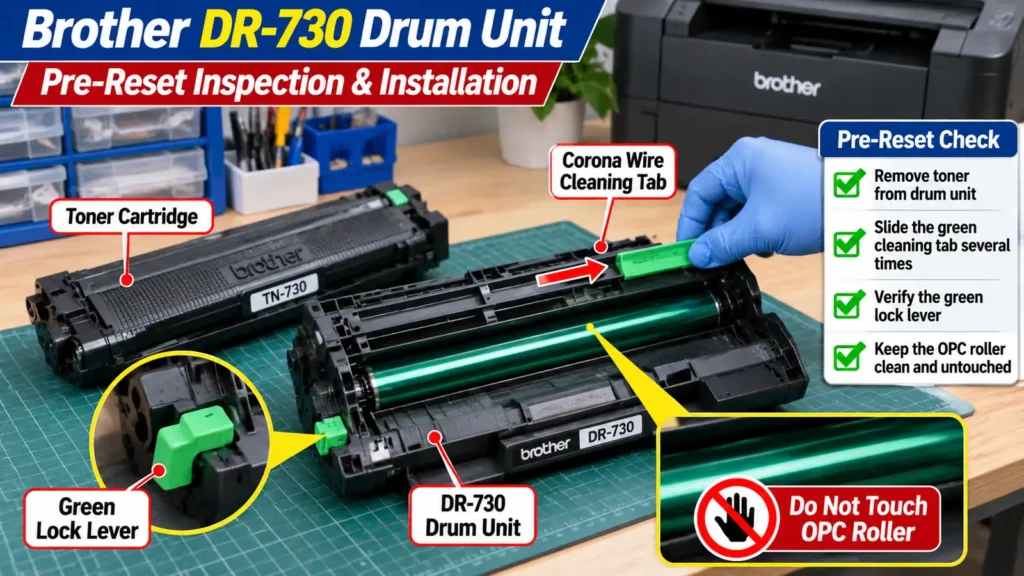
When to Reset—and When Not to Reset—the Drum Counter
Before entering the reset menu, verify why your printer is showing a maintenance message:
-
Do not reset the drum counter when replacing only the toner cartridge. Brother explicitly warns against resetting the drum counter unless a new drum unit has been installed. If you reset the counter while keeping an older drum in service, the printer will no longer calculate remaining drum life accurately and cannot warn you before worn OPC coatings cause background shading or toner leaks.
-
Check whether you replaced the right part. If you installed a fresh TN-730 or TN-760 toner cartridge because the screen said Replace Drum, the printer actually needs a DR-730 drum unit—or a drum counter reset if the drum was already replaced.
-
Distinguish Replace Drum from Drum ! errors. While Drum End Soon and Replace Drum are counter-based maintenance prompts, a Drum ! message indicates a physical charging fault—most commonly a dirty primary corona wire or a green corona cleaning tab left out of its home position. Resetting the counter will not clear a Drum ! fault.
Quick Reference: Brother DR730 Drum Reset Instructions by Printer Model
Find your exact printer model in the table below to identify your control panel type and the corresponding dr730 drum reset instructions. All sequences require the printer to be powered on with the front cover closed.
| Compatible Brother Printer Models | Control Panel Type | Front Cover Position | Exact Keypad or Touchscreen Sequence |
| HL-L2325DW, HL-L2350DW, HL-L2370DW, HL-L2370DWXL, HL-L2379DW | 1-Line Mono LCD | Closed | Hold OK + Up Arrow → Press OK (Drum) → Press Down Arrow |
| HL-L2390DW, DCP-L2550DW, MFC-L2690DW, MFC-L2690DWXL, MFC-L2710DW, MFC-L2717DW | 2-Line Mono LCD | Closed | Hold OK + Up Arrow → Press OK (Drum) → Press Up Arrow |
| HL-L2395DW, MFC-L2730DW, MFC-L2750DW, MFC-L2750DWXL, MFC-L2759DW | Color Touchscreen | Closed | Press Cancel (X) → Hold Toner Icon (5 sec) → Tap Drum → Tap Yes |