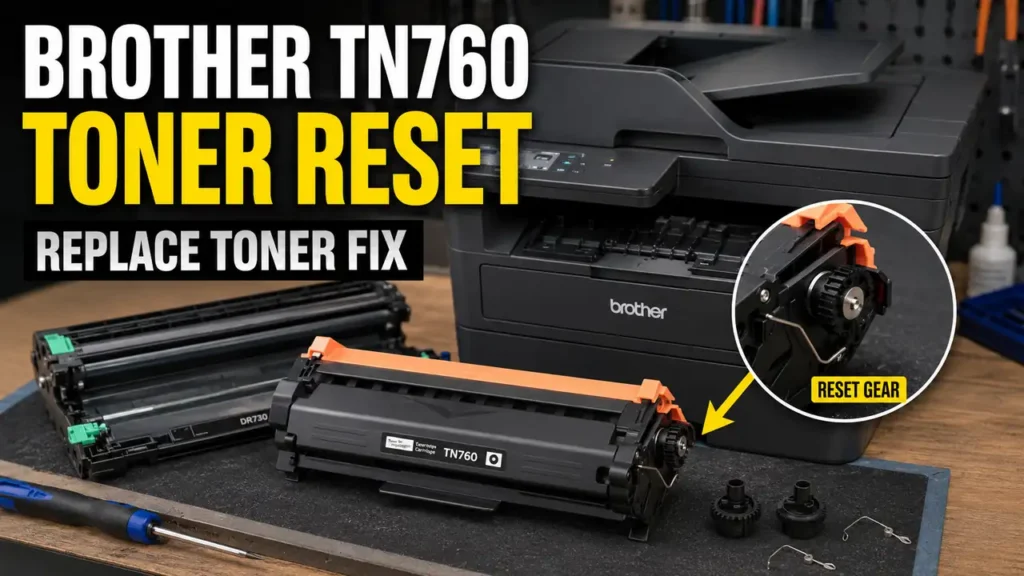
A Brother TN760 Toner Reset Fix is a highly requested diagnostic workaround within the global printer maintenance community.
When Brother monochrome and color laser printers display the “Replace Toner” message, the machine often initiates a hard mechanical lockout.
Unlike other manufacturers that rely strictly on digital EEPROM chips to estimate page counts, Brother utilizes a physical mechanical flag gear mechanism on the side of the toner cartridge.
Once this gear completes its rotational cycle, it stops actuating a microswitch inside the printer chassis. This prompts the logic board to immediately halt all printing operations, even if a significant volume of toner powder remains inside the hopper.
This technical diagnostic guide outlines the mechanical teardown of the cartridge end-cap and the precise torsion spring resetting procedure.
By executing a proper Brother TN760 Toner Reset Fix, it is often possible to bypass the mechanical lockout and evaluate if the remaining toner can be utilized.
Safety Warning and Official Stance: According to Brother International, “Replace Toner” indicates the consumable has reached the end of its functional life and must be replaced with an OEM cartridge. Modifying toner cartridges can lead to toner spillage, internal contamination, and will void manufacturer warranties. This guide is compiled from independent hardware diagnostics and is intended strictly for out-of-warranty educational purposes. Proceed at your own risk. Always work in a well-ventilated area.
Before You Start: Essential Expectations
To align with professional diagnostic standards when performing a Brother TN760 Toner Reset Fix, please review the following limitations before attempting this physical override:
-
Unofficial workaround: This is a community-developed mechanical override, not a manufacturer-approved reset protocol.
-
Contamination risk: Opening a toner cartridge risks spilling ultrafine carbon powder. Polyurethane gloves and a protective workspace mask are highly recommended.
-
Starter cartridge limitations: The “starter” cartridges included in the box with a new printer often lack this reset gear entirely. This protocol typically applies only to standard or high-yield replacement cartridges.
-
Variable outcomes: If the optical corona wire is heavily soiled, or if the developer roller is degraded, resetting the gear will not resolve underlying print quality defects.
Supported Printer Architectures and Consumables
While this guide specifically details a Brother TN760 Toner Reset Fix, this mechanical gear override has been widely documented by repair communities across several Brother laser printer families utilizing similar physical actuation mechanisms.
| Toner Cartridge Series | Notable Supported Printers (Community Reported) | Mechanism Type |
| TN-730 / TN-760 | HL-L2350DW, HL-L2390DW, MFC-L2710DW | Mechanical Flag Gear |
| TN-660 / TN-630 | HL-L2320D, HL-L2340DW, MFC-L2700DW | Torsion Reset Gear |
| TN-223 / TN-227 | HL-L3210CW, MFC-L3770CDW | Multi-Gear Actuator |
| TN-820 / TN-850 | HL-L5100DN, MFC-L5800DW | High-Yield Flag Gear |
Diagnosing the Mechanical Lockout
Understanding the microswitch is vital before executing a Brother TN760 Toner Reset Fix. The Brother toner counting system is a fascinating piece of electromechanical engineering.
Inside the printer chassis, there is a small optical or mechanical microswitch. On the left flank of the toner cartridge, there is a specialized plastic gear under spring tension.
When a brand-new cartridge is inserted, this flag gear sits in a specific “ready” orientation. As the primary drive motor engages, it forces this gear to rotate.
During its rotation, the protruding plastic flag physically sweeps past the microswitch inside the printer. The logic board registers this actuation as a “New Toner Inserted” signal and resets the digital page counter to 100%.
Once the flag sweeps past the switch, it locks into a terminal position and cannot rotate again.
When the printer eventually estimates the toner is empty, it demands a new cartridge. If you reinsert the same cartridge, the flag is already in the terminal position. It cannot hit the switch, and the printer remains locked.
Phase 1: Toner Extraction and Workspace Preparation
Before attempting a Brother TN760 Toner Reset Fix, you must prepare a controlled environment to mitigate contamination.
-
Power down the printer and open the front access door.
-
Extract the entire drum and toner assembly from the machine.
-
Depress the green release lever on the drum unit to separate the toner cartridge from the drum cradle.
-
Place the toner cartridge on a flat workspace covered with disposable newspaper or a silicone mat.
-
Keep the drum unit covered with a dark cloth. The blue/green Organic Photo Conductor (OPC) cylinder is highly sensitive to ambient light degradation.
Phase 2: Side End-Cap Teardown
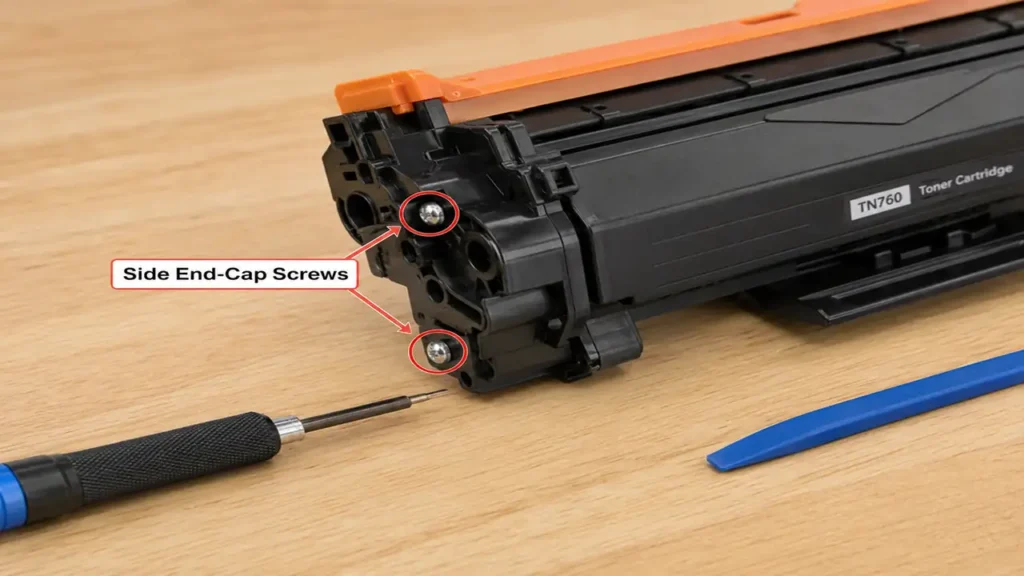
To continue the Brother TN760 Toner Reset Fix, you must dismantle the drive-side of the toner cartridge housing to access the mechanical timing gear.
-
Orient the toner cartridge so the left flank (the side with several white or black plastic gears) is facing upward.
-
Locate the two small Phillips-head screws securing the plastic end-cap to the main cartridge hopper.
-
Carefully remove both screws using a precision #1 Phillips screwdriver.
-
Using a non-marring plastic spudger, gently pry the end-cap upward.
-
Bench Warning: Lift the cap slowly and straight up. Several small gears sit on metal axels beneath this cap. If you pull aggressively, the gears will fall out, disrupting the entire mechanical drive train.
Phase 3: The Flag Gear Repositioning Protocol
This phase is the core of the Brother TN760 Toner Reset Fix diagnostic workaround. You must isolate the reset gear and wind its internal torsion spring.
-
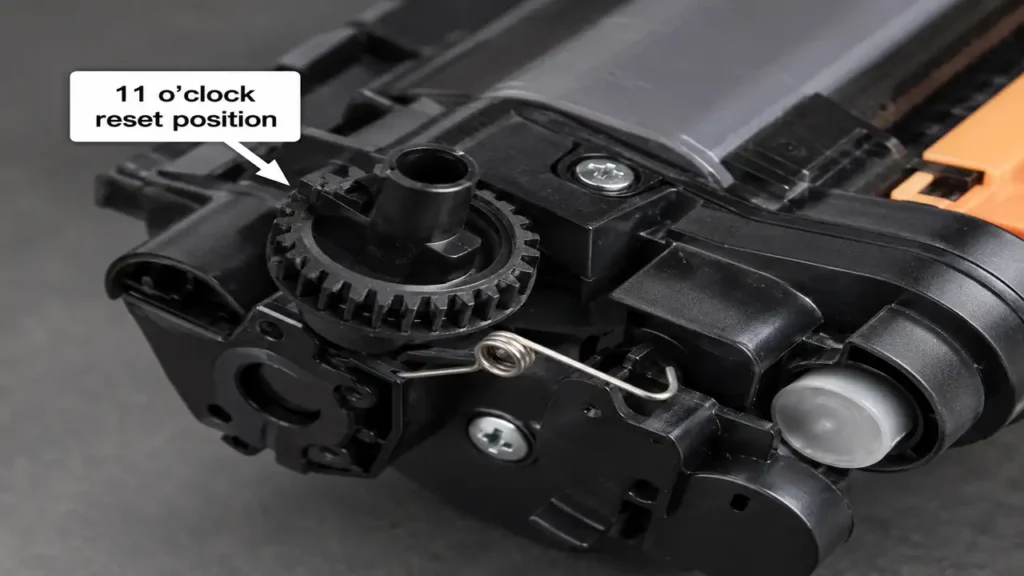
With the end-cap removed, locate the “Flag Gear.” This is typically the outermost gear featuring a distinct, protruding semi-circular plastic wedge (the flag).
-
Carefully lift the flag gear off its metal shaft.
-
Examine the underside of the gear. You will observe a coiled wire torsion spring.
-
To reset the mechanism, you must place the gear back onto the shaft while simultaneously winding the spring tension backward.
-
The Orientation Metric: For TN760 and similar models, the protruding plastic flag must be rotated and held at the “11 o’clock” position (pointing upwards and slightly to the left) relative to the cartridge orientation.
-
While holding the gear firmly in this tensioned “11 o’clock” position with your thumb, proceed immediately to Phase 4.
Phase 4: Reassembly and Mechanical Actuation
If the gear slips during reassembly, your Brother TN760 Toner Reset Fix override will fail, and the spring tension will release. Precision is required.
-
While keeping firm downward pressure on the reset gear with one hand, use your other hand to lower the plastic end-cap back into position.
-
Ensure the axel shafts align perfectly with the holes in the end-cap.
-
Press the end-cap flush against the cartridge body. The end-cap will now hold the flag gear securely in its tensioned state.
-
Reinstall the two Phillips-head screws and tighten them evenly.
-
Reinsert the toner cartridge into the drum unit until it clicks.
-
Install the entire assembly back into the printer, close the front door, and power on the machine.
If the mechanical alignment was successful, the flag gear will rotate, strike the printer’s internal microswitch, and the machine may clear the “Replace Toner” error, allowing you to evaluate the remaining toner powder.